We love Palworld. There is nothing quite like automating a massive assembly line while exploring the new Feybreak island with friends.
But if you have hosted a server for more than a few days, you know the dark side of this game. First, the server runs perfectly. Four hours later, opening a chest takes three seconds. Six hours later, players start rubber-banding. Eight hours later, the server crashes.
Despite the massive patches in 2024 and 2025, Palworld still suffers from memory leaks. As the game tracks thousands of Pals, items, and AI pathfinding nodes across an ever-expanding map, it slowly eats up every megabyte of RAM available until it chokes.
You can’t fix the game’s code, but you can manage it. Here is the East Gate guide to keeping your Palworld server stable, 24/7.
The “RAM Creep” is Real (2026 Requirements)
When Palworld first launched, you could squeeze a small group onto 8GB of RAM. That is no longer safe.
With the addition of Sakurajima and the Feybreak islands, the world map is significantly larger. The server has to keep these chunks loaded, along with the AI for the new Oil Rig stronghold.
Our 2026 Recommendation:
- Buffer is King: If your active RAM usage is 10GB, you need a 14-16GB plan. As soon as you hit 95% usage, the server will start swapping to disk, causing instant lag.
- The Sweet Spot: For a standard group of 4-8 friends exploring separate islands, 12GB to 16GB is now the baseline for a smooth experience without constant crashes.
The Secret Weapon: Scheduled Restarts
Since the game doesn’t clear its own memory effectively, you have to do it for it.
The most effective way to “fix” a memory leak is to restart the server process. This clears the RAM completely and lets the server start fresh.
How to set this up on East Gate (Pterodactyl): You don’t need to be awake at 4:00 AM to reboot the server.
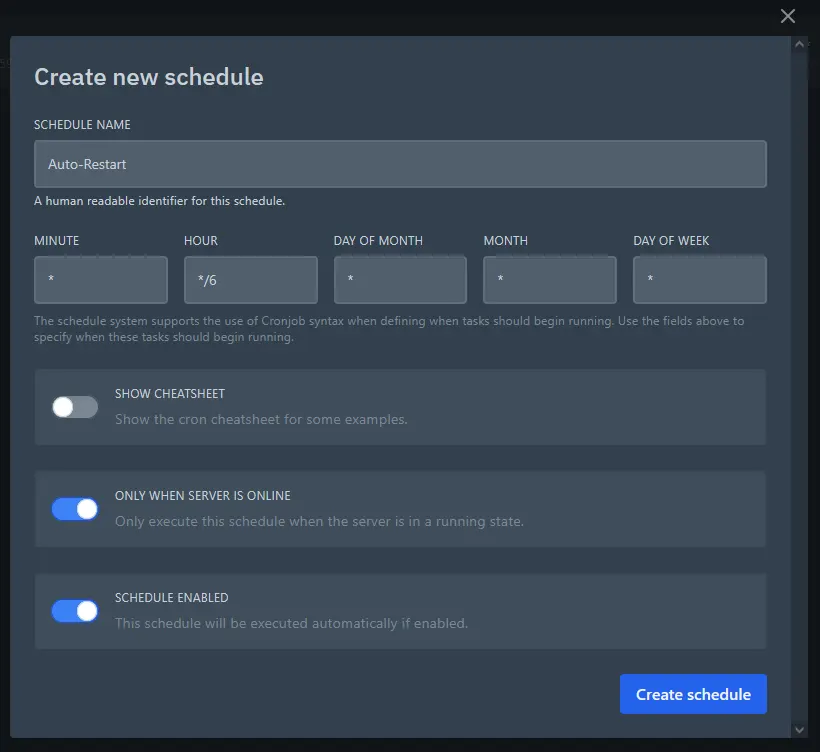
- Go to your Game Panel and click Schedules.
- Create a new schedule named “Auto-Restart”.
- Set the time (e.g.,
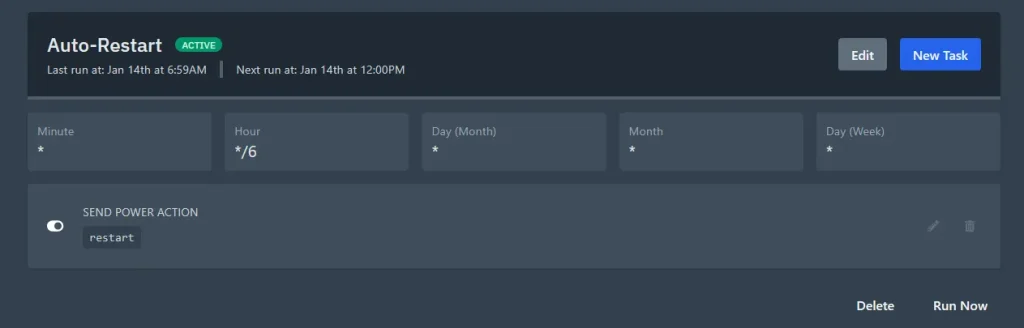
0 */6 * * *for every 6 hours), click on Create Schedule. - Click on created schedule, and then on New Task.
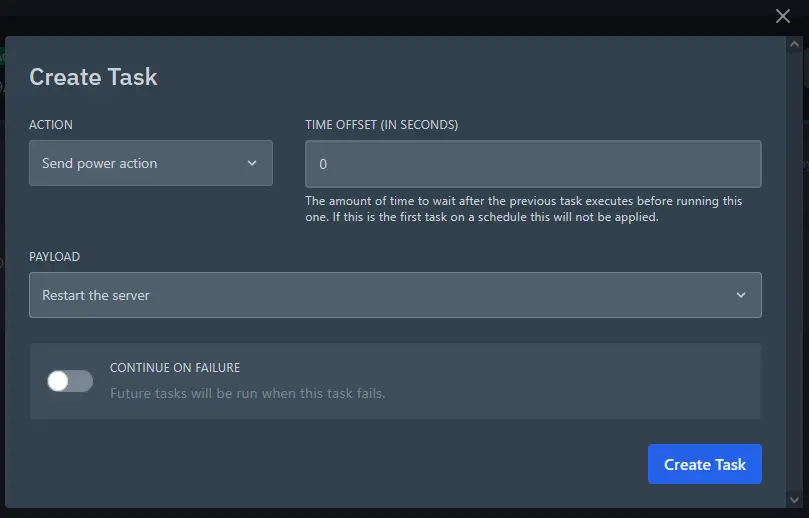
- Add an action:
Send Power Action->Restartthe server, click on Create Task.
Pro Tip: Add a “Send Command” task 5 minutes before the restart that says: Broadcast Server restarting in 5 minutes to clear RAM. Please log out safely. This saves your players from losing progress.
Optimization Settings (PalWorldSettings.ini)
If you are running a server on a budget, you can tweak a few settings in your config file to drastically reduce RAM usage without ruining the fun. Config can be found under “/Pal/Saved/Config/LinuxServer”
DropItemAliveMaxHours: Default is 1.0 (1 hour). Change this to 0.5 (30 minutes).- Why? Thousands of stone and wood items dropped on the ground by mining Pals eat up memory. Cleaning them up faster helps stability.
PalSpawnNumRate: Default is 1.0. If you are lagging, try 0.8.- Why? Slightly fewer wild Pals means less AI pathfinding for the CPU to calculate, which can help with server tick rate (FPS).
RCON is Your Friend
Sometimes, you need to save the server right now because it’s lagging, but you aren’t near your PC.
East Gate servers support RCON (Remote Console). You can use mobile apps or our web panel to send the command DoExit to force a safe save-and-shutdown, or Save to force a world save before you attempt a reboot.
Conclusion: Don’t Fight the Leak, Manage It
Until the developers completely rewrite the engine, memory management is just part of being a Palworld server admin.
The key is hardware and automation. You need enough RAM to handle the leaks, and automated schedules to flush them out. At East Gate Hosting, our panels are built to make this automation easy, so you can focus on breeding the perfect Jetragon.