Every game server administrator has faced the same midnight crisis: your player count spikes, players in Discord start spamming “lag” emojis, and your console logs turn into a wall of performance warnings.
Naturally, you open your hosting dashboard, look at the resource graphs, and see your RAM utilization sitting at 85%. You panic, click “Upgrade Plan” throw another 8GB of RAM at the server, and hit restart. You expect a buttery-smooth gameplay experience, but within an hour, the rubberbanding returns.
Why? Because you just fell for the oldest marketing trap in the game hosting industry.
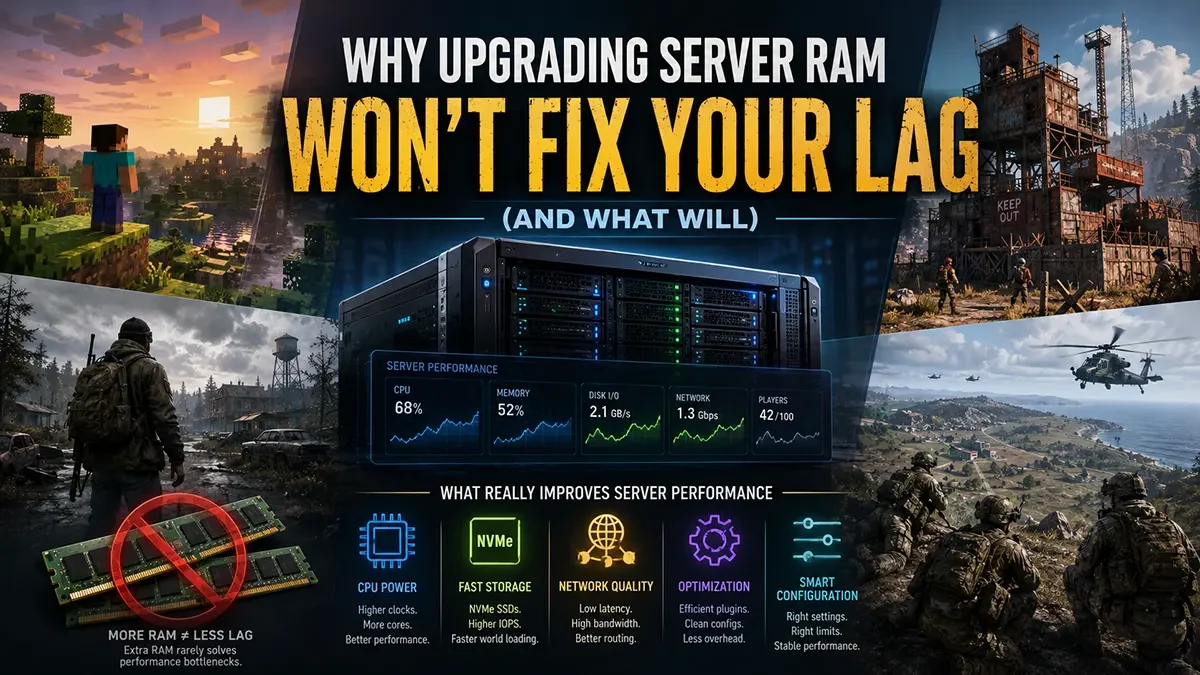
Let’s be completely candid: RAM is rarely the root cause of game server lag. Upgrading your memory when your server is choking is like putting a larger fuel tank on a car with a broken engine, it holds more, but it doesn’t go any faster. Here is the hardware reality check on why your server is actually lagging, and the metrics that truly dictate a stable, high-performance community.
The “Unlimited RAM” Marketing Illusion
Budget game hosts love to sell you on RAM. They offer “Ultimate 32GB Plans” for dirt cheap because memory is incredibly inexpensive to buy and easy to oversell on a shared node.
But RAM is just temporary storage. Its only job is to hold data like player locations, loaded chunks, and mod assets, so the server can access them quickly. RAM does not process that data.
Think of your server like a restaurant kitchen:
- RAM is the size of the kitchen counter.
- The CPU is the chef.
If you give your kitchen a massive, football-field-sized counter (32GB of RAM) but you still only have one slow chef (a bottlenecked CPU core), the food isn’t going to come out any faster. The counter just sits there, mostly empty and completely useless.
The True Culprits Behind Game Server Lag
If memory isn’t the issue, what is? When your server’s ticks start dropping (low TPS or FPS), you are almost always fighting two specific hardware bottlenecks:
1. The Single-Thread CPU Bottleneck
Most modern multiplayer game engines, including Minecraft, DayZ, Rust, and Arma 3, are notoriously single-threaded. While your host might brag about having a “24-Core Enterprise Processor,” your game server physically cannot distribute its core workload across all those cores.
Almost everything that matters, like entity AI, physics calculations, redstone logic, and hit registration, runs on a single CPU core. If that single core is clocked at a low speed, or if your budget host is crowding dozens of servers onto the same processor, your server will choke. It doesn’t matter if you have 64GB of RAM; if the core processing the game loop is maxed out at 100%, your server will lag.
2. Storage Read/Write Inefficiencies (IOPS)
When players are flying across a Minecraft world with Elytras, driving vehicles through Chernarus in DayZ, or blasting through a base wall in Rust, the server has to do something incredibly heavy: load and write world data instantly.
If your server is running on older mechanical hard drives or even standard SATA solid-state drives (SSDs), you are operating on borrowed time. In today’s gaming landscape, NVMe storage is no longer an upgrade – it is the bare minimum requirement. Anything slower than NVMe is practically unacceptable for modern titles and will directly degrade performance.
Without those read/write speeds, you create a massive ‘I/O bottleneck’. Your CPU might be fast enough to calculate the terrain or process entity physics, but it is forced to completely freeze and wait for an outdated storage drive to finish processing the files. This storage lag is the hidden culprit behind those frustrating ‘micro-stutters’ during rapid map exploration and the hard, multi-second freezes that occur during routine world autosaves.
How to Actually Fix Your Server Lag
Stop throwing money at dead slots and unneeded gigabytes. To lock in maximum server performance, you need to target the architecture that actually handles the workload.
1. Right-Size Your Memory
More is not better. In fact, in games like Minecraft, allocating too much RAM can actually trigger massive Java “Garbage Collection” freezes. Stick to what your game actually demands:
- Vanilla / Lightly Modded Survival: 6GB to 8GB is the sweet spot.
- Heavy Modpacks (200+ Mods) or High-Pop DayZ/Rust: 10GB to 16GB is usually the absolute maximum you’ll ever need.
2. Pre-Generate Your Worlds
If your game allows it (like Minecraft or custom survival maps), use pre-generation tools to render the world layout before your players log in. This shifts the heavy lifting away from live gameplay, ensuring your storage drives aren’t breaking a sweat when players explore.
3. Move to Extreme-Frequency Hardware
If you have optimized your files and your server is still lagging, it’s time to fire your host and upgrade your infrastructure.
At East Gate Hosting, we don’t use marketing gimmicks or hide behind meaningless RAM metrics. We build our infrastructure entirely around the hardware that actually dictates game performance: unthrottled, extreme-frequency CPUs engineered to crush single-thread bottlenecks.
We pair our high-performance processing with pure Enterprise NVMe storage, delivering the blistering IOPS required to handle rapid chunk generation, massive entity counts, and heavy database saves without a single dropped frame. Managed through our tailored Pterodactyl panel, you get bare-metal performance with total administrative convenience.
Stop paying for bloated RAM plans that don’t fix the problem. Give your community the single-core speed it actually deserves.